
 Written By :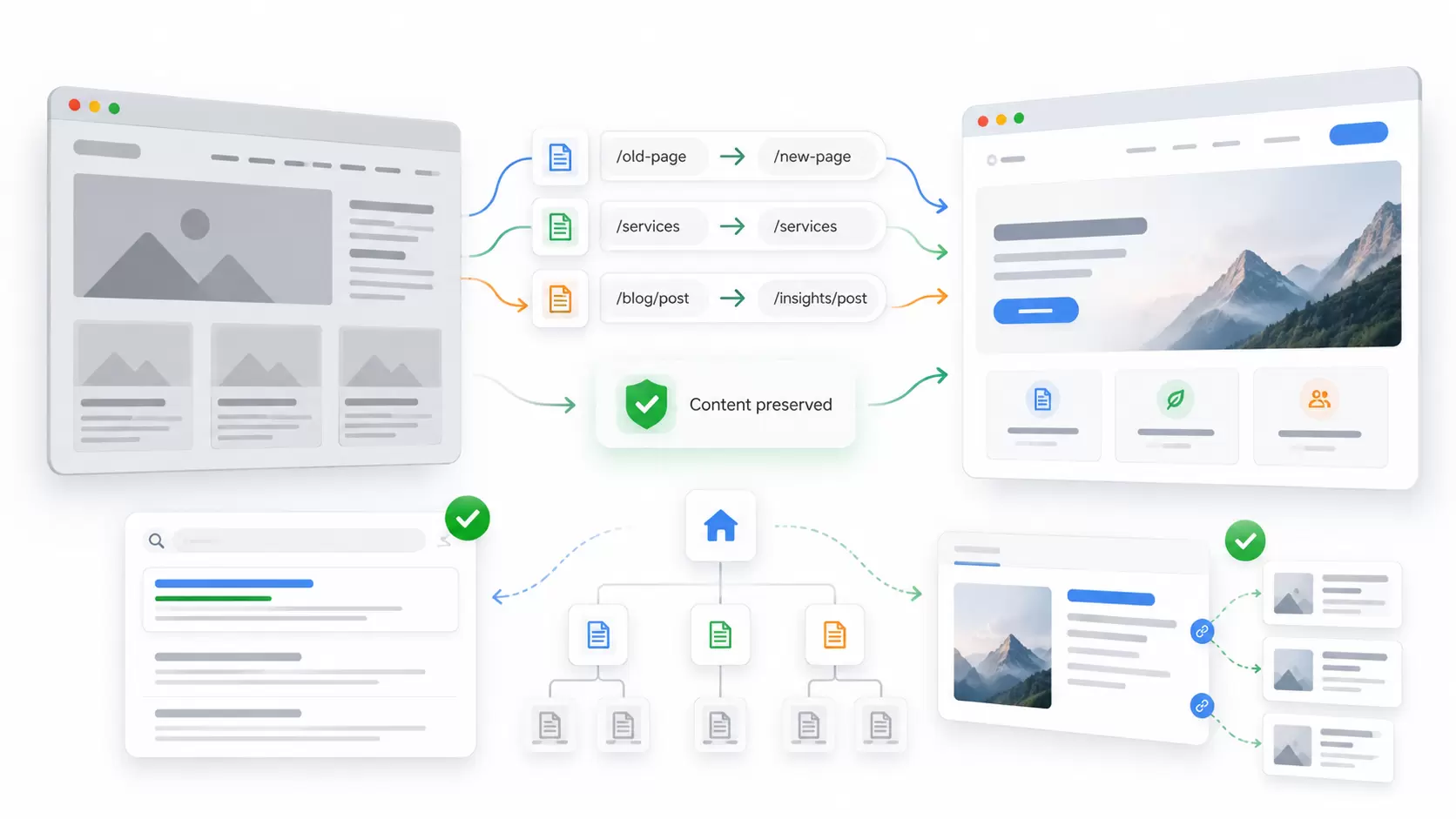
 ChatGPT
 Perplexity
 Claude
 Gemini
A website redesign can make your business look more professional, improve navigation, and create a better experience for customers. But without a proper website redesign SEO plan, it can also put your existing search rankings and organic traffic at risk.
The challenge is not simply changing the design. It is making sure search engines can still find, understand, and trust your important pages after the relaunch.
This guide explains how to redesign a website without losing SEO value, from the first audit to post-launch monitoring. You'll learn what to preserve, how to manage redirects, which technical checks matter, and what to do if rankings drop.
TL;DR: Key Takeaways
-
Protect what already works. Record your top-performing URLs, content, search queries, backlinks, and conversions before redesigning.
-
Plan technical changes before launch. Keep existing URLs where possible, create relevant 301 redirects for moved pages, and check indexing, canonicals, internal links, and tracking.
-
Monitor the relaunch. Use Google Search Console, GA4, and a website crawler to find problems early. Some ranking fluctuations are normal, but technical errors should be fixed promptly.
What Is Website Redesign SEO, and Can a Redesign Hurt Rankings?
Website redesign SEO is the process of protecting and improving a site's search visibility while changing its design, structure, content, technology, or user experience.
A redesign does not automatically cause a ranking loss. The risk depends on what changes behind the scenes.
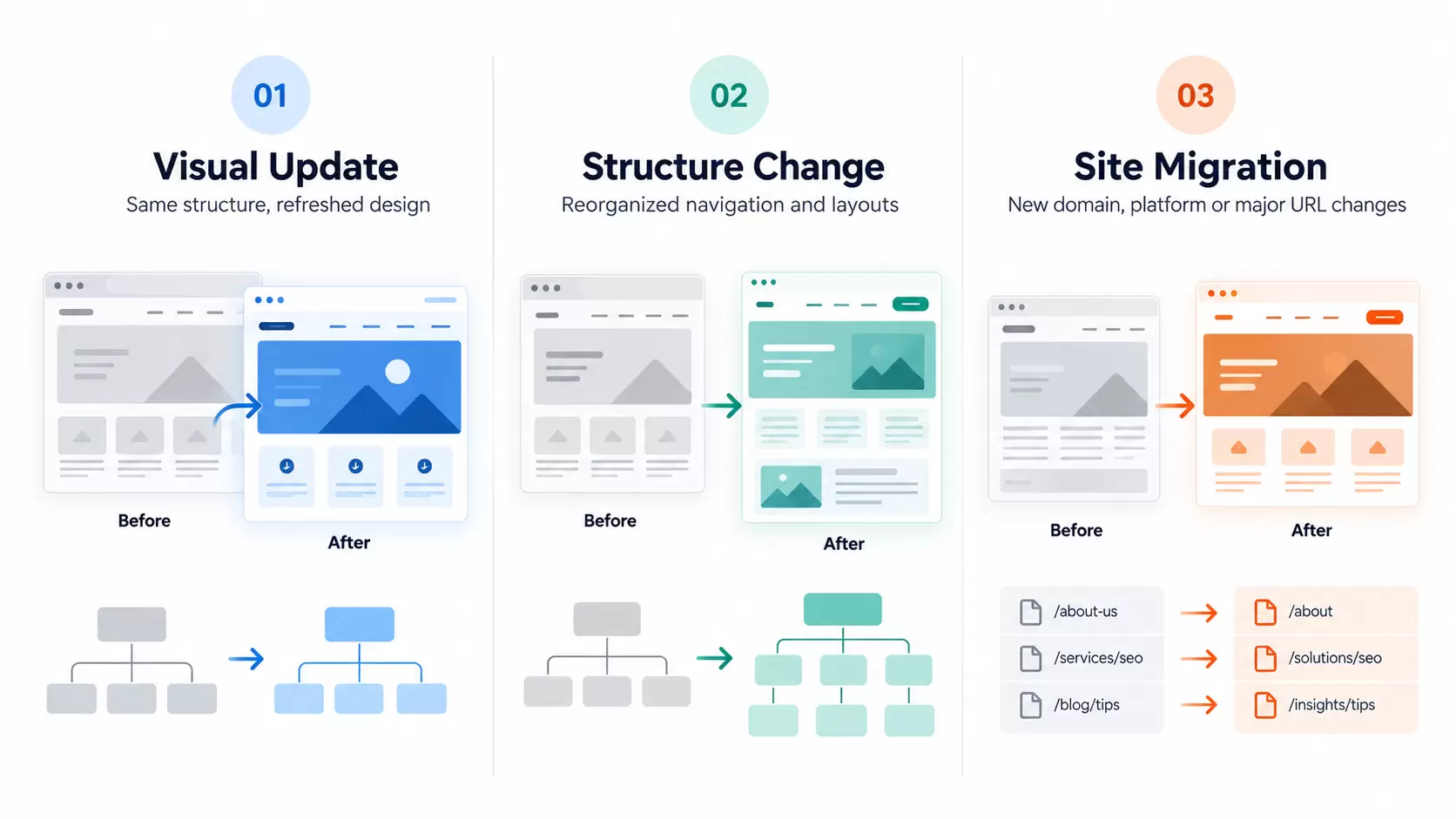
For example, updating colors, fonts, and page layouts while preserving existing URLs and important content is usually less disruptive than replacing a CMS, changing the site's URL structure, and rewriting every service page at once.
Google's site migration guidance explains that significant URL changes can cause temporary ranking fluctuations while Google discovers and processes the new pages.
The following table shows how different redesign decisions affect SEO risk.
| Redesign change | Relative SEO risk | What to check |
|---|---|---|
| New colors, fonts, and visual styling | Lower | Content visibility, mobile usability, and page speed |
| New page layouts and navigation | Moderate | Internal links, headings, page hierarchy, and crawl depth |
| Rewritten or consolidated content | Moderate to higher | Search intent, important information, and existing rankings |
| Changed URL structure | Higher | URL mapping, redirects, canonicals, and XML sitemap |
| New CMS or JavaScript framework | Higher | Rendered content, metadata, crawlability, and server responses |
| New domain combined with a redesign | Higher | Domain redirects, Search Console setup, and site migration signals |
These are relative risk levels, not guarantees. A small design change can still create a major problem if it accidentally hides content or blocks indexing.
Key Insight: A successful redesign should improve how visitors use the website without removing the content, links, and technical signals that help search engines understand it.
Before the Redesign: Find Out What Your Website Already Does Well
A reliable SEO website redesign starts with an inventory of the current website.
Without a baseline, you cannot tell whether the new site has protected its strongest pages or introduced new problems.
1. Record your existing SEO performance
Start with Google Search Console and Google Analytics 4.
In Google Search Console, export:
-
Organic search clicks and impressions
-
Top landing pages and their search queries
-
Average search positions and click-through rates
-
Important pages receiving non-branded searches
-
Search appearance data where relevant
-
Existing indexing and technical issues
In GA4, record organic landing-page sessions, important engagement metrics, leads, sales, and other conversions that matter to the business.
Use a recent three-month period as a starting point, but review a longer period when seasonality or irregular traffic patterns could affect comparisons.
Don't evaluate the site using total traffic alone. A service page generating qualified leads may be more important than a blog post attracting many informational visits.
This is where an initial SEO audit or professional SEO assessment helps establish which pages deserve the most protection.
2. Crawl the existing website and save a complete URL inventory
Use a website crawler such as Screaming Frog, Sitebulb, or another reliable crawling tool.
Export each page's:
-
URL and HTTP status code
-
SEO title and meta description
-
H1 and other important headings
-
Canonical URL
-
Indexability status
-
Internal links and crawl depth
-
Structured data where applicable
-
Images and important media
-
Redirect destinations
Combine this crawl with the XML sitemap, Search Console performance data, analytics, CMS exports, and backlink information.
A crawler alone may miss orphan pages, historical URLs, or URLs that are not linked from the current navigation.
Save the old website's crawl and a backup of its content. You will need both to compare the pre-launch and post-launch versions.
3. Identify the content that should stay
A common redesign mistake is replacing useful service-page copy with a short headline and a few promotional statements because the new design looks cleaner.
Before removing anything, ask:
-
Does this page receive organic clicks or impressions?
-
Which searches does it answer?
-
Does it attract relevant backlinks?
-
Does it generate inquiries or sales?
-
Is the content still accurate and helpful?
-
Is there another page that genuinely serves the same purpose?
Keep the important answers, service details, topical coverage, and useful supporting information.
You can improve the writing, remove outdated information, and reorganize sections. Just avoid changing the page's entire purpose without understanding why it currently performs.
A documented SEO content strategy can help separate pages that need improvement from pages that should remain largely intact.
How to Redesign a Website Without Losing SEO: Build a URL Migration Plan
One of the most important website redesign SEO considerations is what happens to existing URLs.
Every old page needs a clear decision before the new website goes live.
Keep existing URLs whenever possible
If a page is already ranking, relevant, and logically organized, there may be no reason to change its address.
For example, a website redesign does not require changing /services/roof-repair/ to /roofing-services/ simply because the new URL sounds different.
Keeping an existing URL reduces the number of moving parts and avoids unnecessary redirect work.
Create a redirect map for URLs that must change
When an existing page moves to a new address, use a permanent server-side 301 redirect, or a 308 where appropriate, pointing to the most relevant new URL.
Google recommends permanent redirects for lasting URL changes. It also confirms that a correctly implemented permanent redirect does not inherently cause a loss of PageRank.
A useful redirect mapping sheet should contain these columns:
| Old URL | New URL or action | Decision | Priority |
|---|---|---|---|
/services/technical-seo/ |
/seo/technical/ |
301 to equivalent page | High |
/guides/website-speed/ |
Keep existing URL | No redirect | High |
/blog/old-seo-guide/ |
/blog/updated-seo-guide/ |
301 if content is genuinely consolidated | Medium |
/events/expired-event/ |
Return 404 or 410 | Removed with no relevant replacement | Low |
These are hypothetical examples, not JDG website URLs.
For a complete migration spreadsheet, also record page type, existing organic traffic, backlinks, redirect status, responsible team member, and QA result.
Avoid creating redirects to the homepage simply because the original page no longer exists. Google warns that irrelevant redirects can be interpreted as soft 404 errors.
If a page has permanently disappeared and has no useful replacement, a proper 404 or 410 response may be more appropriate.
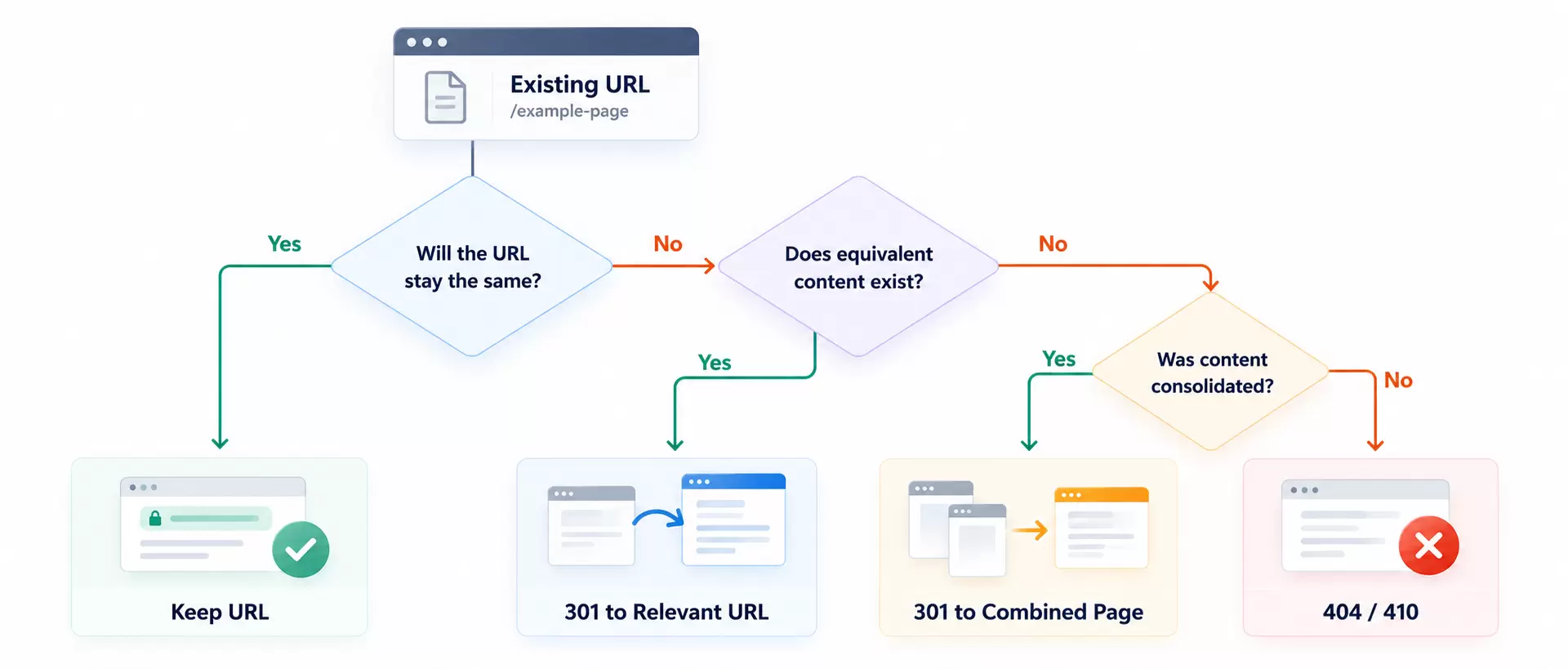
Decision Framework: Keep the URL when the page remains in place. Use a permanent redirect when the content moves. Redirect consolidated pages to the genuinely relevant combined page. Return an appropriate error response when content is permanently gone with no replacement.
Avoid redirect chains and conflicting signals
A redirect should ideally take users and crawlers directly to the final destination.
Avoid a chain such as:
Old URL → Temporary URL → Another URL → Final URL
Also check for conflicts between redirects, canonical tags, internal links, and XML sitemap entries.
Google advises keeping permanent redirects for at least one year after a site move, and often longer for users or external links that still reach the old addresses.
For larger changes involving a CMS, host, or domain, a structured website migration service can help coordinate URL mapping with development, testing, and deployment.
Protect On-Page SEO While Building the New Website
The redesigned pages should preserve their search intent, not simply their appearance.
Keep important titles, headings, and page information
Review the most valuable pages individually.
Check that the redesign preserves or thoughtfully improves:
-
Unique SEO titles and meta descriptions
-
Clear H1 headings and logical H2/H3 structure
-
Main service or product information
-
Relevant supporting content and FAQs
-
Descriptive internal links
-
Appropriate image alt text
-
Existing structured data that remains accurate
Don't copy old metadata without reviewing it. Some pages may benefit from better titles, clearer descriptions, or more helpful content.
However, avoid rewriting every high-performing page at the same time as a major technical migration. That makes it harder to identify which change caused a problem.
Review the new site structure and internal links
Navigation changes affect how visitors and search engines discover your pages.
Make sure important services, product categories, and content hubs are easy to reach through normal HTML links.
Update internal links to point directly to the final destination URLs, rather than relying on redirects.
During web design and development, review the menu, footer, breadcrumbs, related content, and internal links within page copy.
Check canonical tags and indexability
A canonical tag tells Google which URL you prefer as the main version when similar or duplicate pages exist.
After the redesign, check that important indexable pages use the correct canonical URL. In a typical migration, the new canonical page should reference its new address, not its old one.
Also verify that important pages do not accidentally contain:
-
A
noindexdirective -
A robots.txt rule blocking required resources or pages
-
Canonical tags pointing to staging or outdated URLs
-
Login restrictions intended only for development
-
Incorrect
404,403, or5xxserver responses
Canonical tags are signals, not absolute commands, so consistent signals across the site are important.
Make sure Google can access the actual page content
Modern redesigns sometimes introduce heavier JavaScript frameworks, client-side navigation, and interactive elements.
Google can render JavaScript, but rendering introduces another dependency. Check that important content appears in the rendered HTML and that internal links use crawlable URLs.
For JavaScript-heavy websites, server-side rendering or pre-rendering may help make important content available more reliably.
For WordPress redesigns, review plugin behavior, permalink settings, themes, and indexation controls. These are also relevant parts of WordPress SEO.
Improve performance without hiding important content
A redesigned website should work well on mobile and load smoothly.
Pay attention to oversized images, animation, layout shifts, heavy scripts, and third-party tools.
Google's Core Web Vitals guidance identifies these good-experience targets:
| Metric | What it measures | Recommended target |
|---|---|---|
| Largest Contentful Paint (LCP) | Loading performance | 2.5 seconds or less |
| Interaction to Next Paint (INP) | Responsiveness | 200 milliseconds or less |
| Cumulative Layout Shift (CLS) | Visual stability | 0.1 or less |
These targets help assess page experience. Achieving them does not guarantee higher search rankings.
Test the Redesign on Staging Before Going Live
A staging website allows the team to inspect the new version before it replaces the live site.
However, staging itself can create SEO problems if its content becomes publicly indexable or if its blocking settings are copied into production.
Google recommends password protection for content that should remain private. A robots.txt disallow rule by itself does not guarantee that a URL will stay out of Google Search.
Before launch, test the staging environment with an authorized crawler or appropriate preview access.
Review these areas:
-
Crawlability: Can important pages, navigation links, and resources be reached?
-
Indexability: Will the production pages be eligible for indexing after deployment?
-
Content: Are important paragraphs, headings, and resources present?
-
Metadata: Are titles, canonicals, and robots directives correct?
-
Redirects: Are changed URLs mapped to relevant live destinations?
-
Mobile usability: Do navigation, forms, and content display properly?
-
Functionality: Do contact forms, shopping carts, search tools, and CTAs work?
-
Tracking: Are GA4, Google Tag Manager, and conversion events configured correctly?
If the staging site is password-protected, its access restrictions should not accidentally carry over to production.
Example: A redesign passes visual QA, but the new service-page template still contains a staging
noindexdirective. The pages look normal to visitors, yet search engines are instructed not to index them. A pre-launch SEO check can catch the issue before it affects the live site.
Website Redesign SEO Checklist: Before, During, and After Launch
Use this checklist as the final approval document between your SEO, design, development, and marketing teams.
Before launch
-
Export Search Console and GA4 performance baselines.
-
Save the current website crawl and backup.
-
Identify important ranking, backlink, and conversion pages.
-
Approve URL changes and the complete redirect map.
-
Review titles, descriptions, headings, content, and internal links.
-
Check canonicals, structured data, hreflang where used, and XML sitemap URLs.
-
Test staging crawlability, mobile usability, performance, and forms.
-
Confirm that production indexability settings will be correct.
-
Prepare an owner-approved rollback and recovery plan.
On launch day
-
Confirm that the website and redirects are live.
-
Verify priority URLs return correct HTTP status codes.
-
Remove staging-only restrictions from production.
-
Check robots.txt,
noindex, and canonical tags. -
Test old-to-new redirects and identify chains.
-
Submit the updated XML sitemap in Google Search Console.
-
Confirm that analytics and conversion tracking are working.
After launch
-
Crawl the production website and compare it with the baseline.
-
Monitor Search Console indexing, crawl errors, and search performance.
-
Track priority pages and important search queries.
-
Check GA4 organic traffic and conversion trends.
-
Fix unexpected 404s, broken internal links, and incorrect redirects.
-
Review Core Web Vitals and key user journeys.
-
Record issues, owners, fixes, and validation results.
Launch sign-off rule: Do not approve a relaunch when important pages are unintentionally blocked, major redirects are broken, or essential customer actions fail.
What Should Happen on Website Relaunch Day?
A website relaunch works best as a controlled sequence, not a single publish button.
1. Confirm backups and rollback access
Make sure the team can restore the previous site or repair the deployment if a critical issue appears.
Assign a responsible person for hosting, DNS, redirects, SEO checks, and conversion tracking.
2. Deploy the website and activate redirects
Publish the production version and activate the approved permanent redirect rules.
Verify that changed URLs lead to the correct final pages.
3. Verify search engine access
Check live robots.txt rules, meta robots directives, canonical tags, HTTP responses, and essential resources.
Pay special attention to high-value service, category, product, and location pages.
4. Crawl and test priority pages
Run a targeted production crawl, then test the full site as soon as practical.
Check navigation, internal links, primary conversion paths, mobile behavior, and the most important redirects.
5. Update Search Console and the XML sitemap
Submit the new XML sitemap to Google Search Console and inspect important new URLs.
If the website has moved to a different domain or eligible subdomain, review Google's Change of Address tool.
That tool is not intended for ordinary page-path changes within the same website.
6. Confirm tracking and document launch status
Test lead forms, purchase events, phone-click tracking, and other important conversions.
Record any remaining issues and who will fix them.
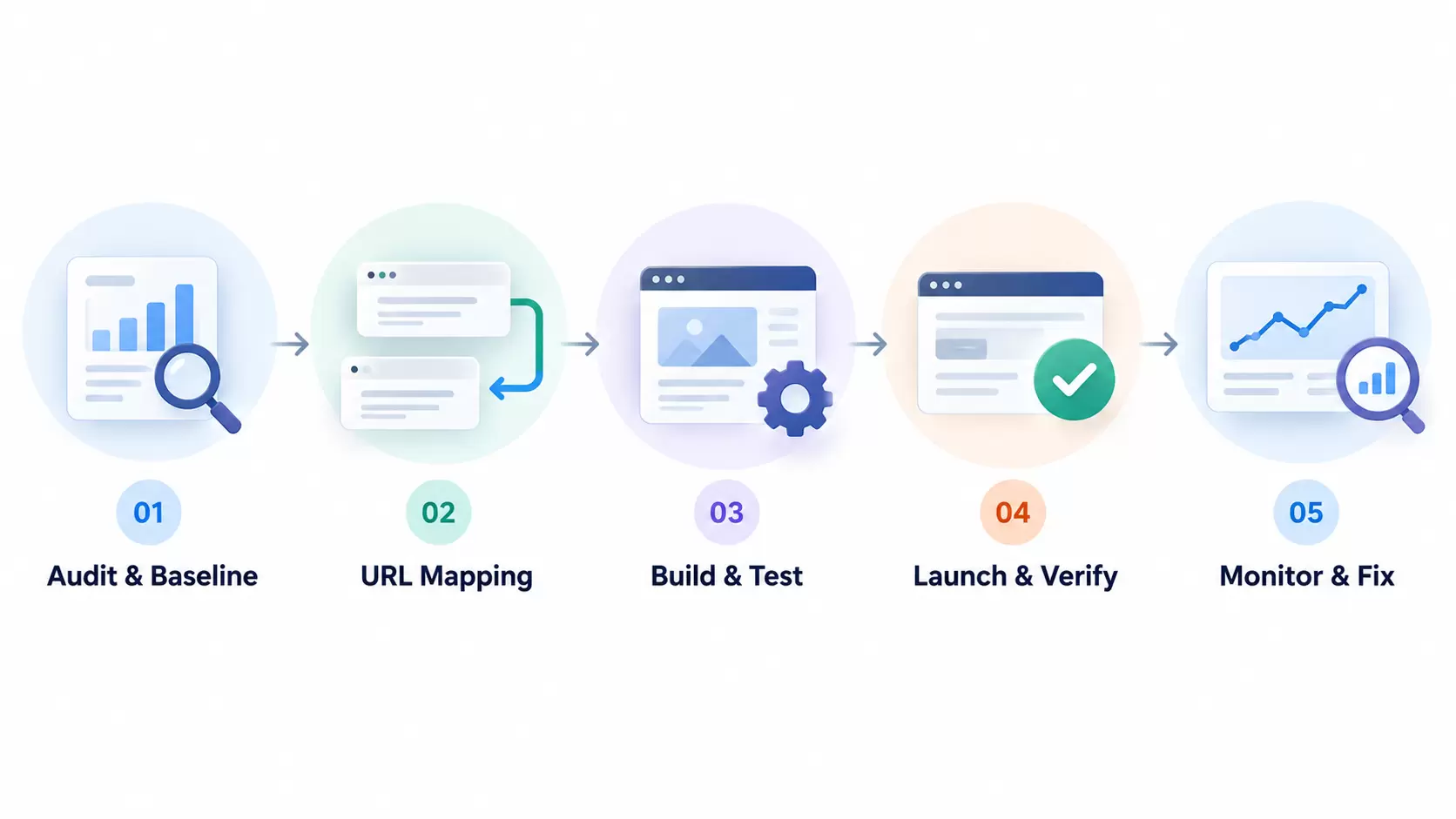
How to Monitor SEO Performance After a Website Redesign
Publishing the new website is not the end of the redesign project.
Search engines need time to crawl, process, and evaluate changes. Google explains that substantial site moves can take weeks or longer to settle, depending on the size and complexity of the website.
A sensible monitoring plan separates expected fluctuations from technical problems.
First 24–48 hours: Check technical health
Focus on issues that can prevent pages from being discovered, indexed, or used.
Check:
-
Unexpected
noindexdirectives or robots.txt restrictions -
Priority URLs returning errors
-
Incorrect or missing redirects
-
Canonical tags pointing to the wrong pages
-
Broken navigation and internal links
-
Missing or duplicated tracking
-
Forms and conversions that stopped working
Do not judge the redesign's ranking success from a single day of Search Console data.
First two weeks: Compare important landing pages
Review Search Console performance regularly.
Compare clicks, impressions, search queries, and rankings for key pages. For moved pages, evaluate the old URL and its replacement together while Google transitions its indexing.
Watch for groups of pages experiencing similar declines. A sudden loss across an entire service category is more useful diagnostically than a small movement in one keyword.
Following weeks: Review search and business outcomes
Continue monitoring as the site settles.
Compare suitable pre-launch and post-launch periods, accounting for seasonality, branded versus non-branded traffic, and normal demand changes.
Review:
-
Organic clicks and impressions
-
Landing-page rankings
-
Indexed URL trends
-
Redirect and crawl health
-
Organic leads, bookings, or sales
-
Mobile performance and Core Web Vitals
Remember that Search Console and GA4 measure different things. A fall in GA4 sessions without a matching fall in Search Console clicks may point to a tracking or reporting issue.
For more on connecting traffic to business results, see JDG's website marketing guide.
How to investigate a traffic drop
| What you notice | Possible cause | First action |
|---|---|---|
| Many pages lose impressions suddenly | Crawling, indexing, or canonical issue | Check robots rules, noindex, Page Indexing, and URL Inspection |
| Only moved pages lose traffic | Redirect or URL mapping problem | Test old URLs, destination relevance, and redirect status |
| One page loses rankings for key topics | Important content or search intent changed | Compare old and new headings, copy, and page purpose |
| Organic sessions fall but Search Console clicks remain stable | Analytics or attribution issue | Check GA4 tags, consent settings, and landing-page reports |
| New pages are accessible but not appearing in Search | Discovery or indexing delay, or technical conflict | Inspect URLs, internal links, sitemap, and canonical signals |
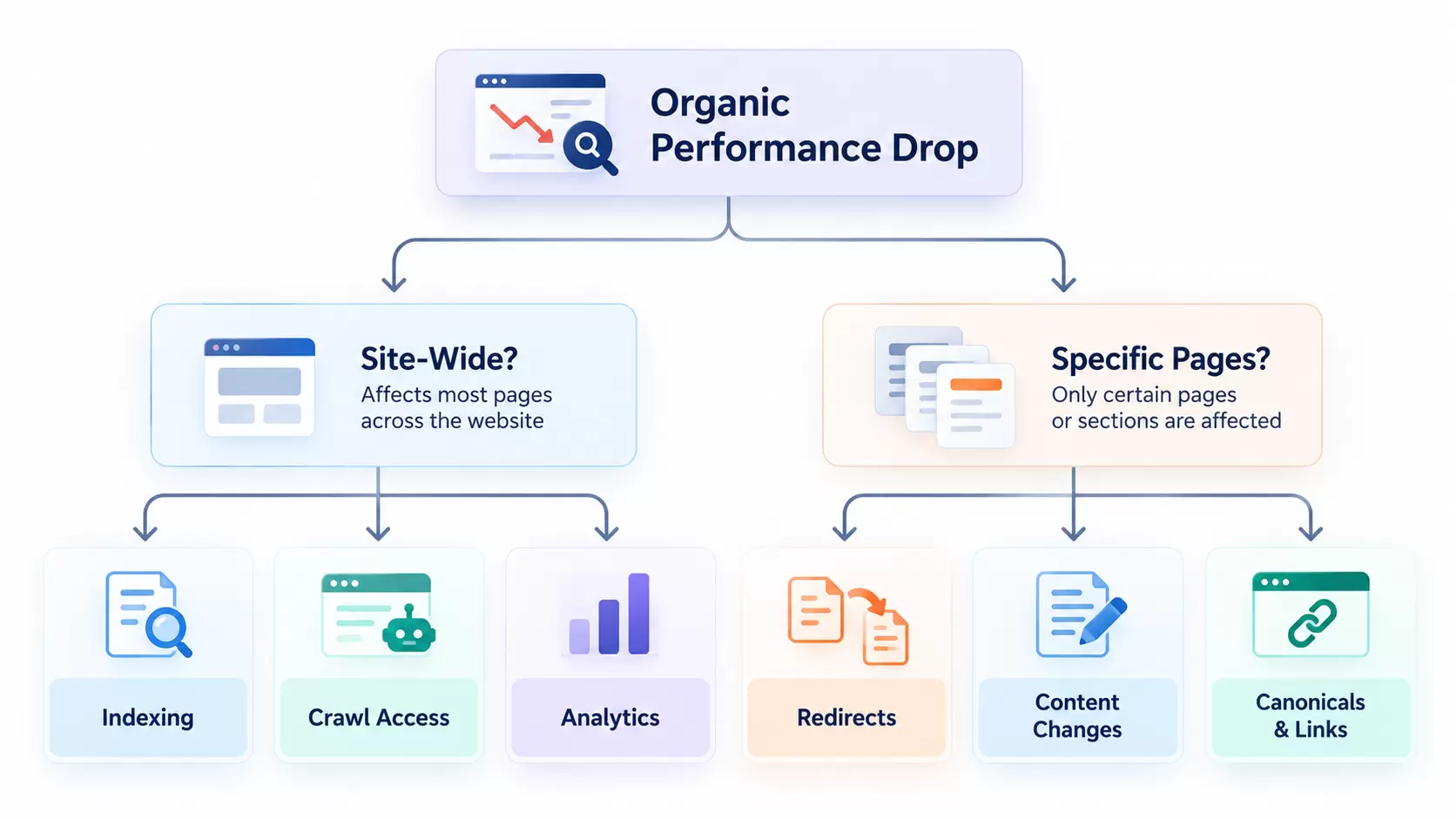
Key Insight: Diagnose the pattern before choosing a fix. A site-wide decline, a category-specific decline, and a tracking failure require different responses.
Special SEO Considerations for Different Website Redesigns
Not every website has the same migration risks.
Ecommerce websites
Protect product and category URLs, breadcrumbs, product data, filters, and inventory-related pages.
Check product structured data, important category content, canonical rules for filtered URLs, and purchase tracking.
Do not redirect unavailable products to unrelated categories without considering relevance and customer intent.
Local business websites
Keep important location pages, business details, local service content, and contact information accurate.
If location URLs change, update relevant internal links and owned business profiles. Review location-specific rankings separately from national organic traffic.
WordPress or CMS migrations
Review permalink rules, plugins, template-generated metadata, XML sitemaps, media paths, and redirects.
Switching platforms is not a reason to replace every URL or rewrite all existing content.
JavaScript-heavy redesigns
Verify server responses, rendered page content, crawlable internal links, and metadata.
A page that looks correct in a browser is not automatically a page that a search crawler can interpret reliably.
Domain changes
Treat a domain move as a separate migration decision.
Preserve the old domain and required redirect infrastructure. Verify the old and new Search Console properties and follow Google's domain-move guidance.
Where possible, avoid combining a domain move with extensive content and architecture changes at the same time.
Common Website Redesign SEO Mistakes to Avoid
Even a visually impressive website can underperform after launch when basic SEO requirements are missed.
The most common mistakes include:
-
Deleting pages without checking their value. Important traffic, backlinks, and useful content can disappear.
-
Changing URLs without a redirect map. Old search results and backlinks may lead to errors.
-
Redirecting everything to the homepage. Irrelevant destinations can confuse users and search engines.
-
Launching with staging restrictions. Accidental
noindexrules or access blocks can stop important pages from being indexed. -
Replacing useful content with minimal copy. The new pages may no longer answer the searches they previously served.
-
Ignoring internal linking. Important pages can become harder to discover.
-
Changing the CMS, domain, URLs, and content without a clear plan. Multiple simultaneous changes make troubleshooting harder.
-
Forgetting conversion tracking. Even if traffic remains stable, the team may lose reliable data about leads or sales.
-
Stopping SEO work on launch day. Problems that appear after publication can go unnoticed.
A website redesign should make the site easier to use and improve its technical foundation. It should not create a new set of problems that could have been caught during testing.
Relaunch Your Website With a Clear SEO Plan
A successful website redesign is not just about creating a better-looking site. It is about protecting existing visibility while improving content, navigation, performance, and the customer experience.
Start with a complete SEO baseline. Keep valuable URLs where possible, map any changes, test the new website carefully, and monitor the results after launch.
You cannot guarantee that rankings will never fluctuate. But a well-managed redesign can reduce avoidable problems and give the new website a stronger foundation for future growth.
If you're planning a redesign, Just Digital Gurus offers SEO consulting and website development support to help assess risks, review technical changes, and prepare for a more controlled relaunch.
Plan your website redesign with SEO in mind before development begins.
Frequently Asked Questions
Does redesigning a website affect SEO?
Yes, it can. Changes to URLs, content, navigation, page templates, and technical settings may affect how search engines discover and understand a website. A visual redesign that preserves important URLs and content generally carries less migration risk than a complete rebuild.
How do I redesign my website without losing SEO?
Start with an SEO audit, identify important pages, preserve useful content, keep existing URLs where practical, and use relevant permanent redirects for changed URLs. Test staging, check indexing signals, and monitor Search Console after launch. These steps reduce risk but do not guarantee unchanged rankings.
Do I need 301 redirects for every page during a website redesign?
No. A page that keeps the same URL does not need a redirect. Use a permanent redirect when a URL changes and a relevant replacement exists. If content has been removed permanently with no replacement, a genuine 404 or 410 response may be appropriate.
How long does SEO take to recover after a website redesign?
There is no fixed recovery period. Google notes that significant site moves can take a few weeks or longer to process, with large websites potentially taking more time. Recovery also depends on the quality of the redirects, content changes, crawlability, and other SEO factors. A technical problem may require a direct fix rather than waiting.
Should I change my domain when redesigning my website?
Only when there is a clear business reason, such as rebranding or consolidation. A domain move adds complexity because search engines must discover and process new URLs. If a domain move is necessary, use appropriate permanent redirects, verify Search Console properties, and follow Google's site migration guidance.
What is the most important website redesign SEO consideration?
Protecting the existing pages that generate valuable organic traffic and conversions is one of the most important priorities. This involves understanding their current performance, preserving relevant content, and managing URL changes correctly.
What should I do if my website traffic drops after relaunching?
First, check whether the drop appears in Google Search Console, GA4, or both. Inspect indexing, redirects, canonicals, and content changes. Compare affected pages with their previous versions and prioritize technical problems that impact large sections of the website.

Your comment will appear after approval.