
 Written By :
 ChatGPT
 Perplexity
 Claude
 Gemini
If you've been researching website platforms lately, Webflow keeps showing up. And once you dig into why, it starts making a lot of sense.
It sits in this interesting middle ground between a drag-and-drop website builder and a fully custom-coded site. Businesses are realizing that's actually the sweet spot they've been looking for. You get real design freedom, solid performance, and a content management experience that doesn't require a developer every time someone needs to change a headline.
This guide covers everything worth knowing about Webflow website development, from how the platform works to what custom development actually looks like, multi-language support, comparison tables, and how to find a team that knows what they're doing.
If you want to see what this looks like in practice before reading further, our web design and development work and portfolio show real examples of sites we've built for clients across industries.
What Is Webflow Website Development?
Webflow is a visual web development platform where designers and developers build fully functional, production-ready websites without writing code from scratch. The key difference from other visual builders is what's happening under the hood: the output is clean, semantic HTML, CSS, and JavaScript, not bloated template code.
Understanding Webflow's Visual Development Approach
Every design decision you make in Webflow's editor, spacing, layout, typography, animations, breakpoints, translates directly into real web code. You're not working around a system. You're working with one that generates genuinely good output.
How Developers and Designers Collaborate in Webflow
| Role | What They Do in Webflow |
|---|---|
| Designer | Builds layouts, manages typography, handles visual interactions |
| Developer | Adds custom code, sets up integrations, manages CMS logic |
| Content Editor | Updates copy, images, and blog posts through the CMS interface |
| Project Manager | Reviews changes in staging, manages publishing workflow |
This collaboration model removes a lot of the friction that slows traditional web projects down. Designers aren't waiting on developers for every layout tweak. Editors aren't filing tickets to change a paragraph.
Why Businesses Choose Webflow
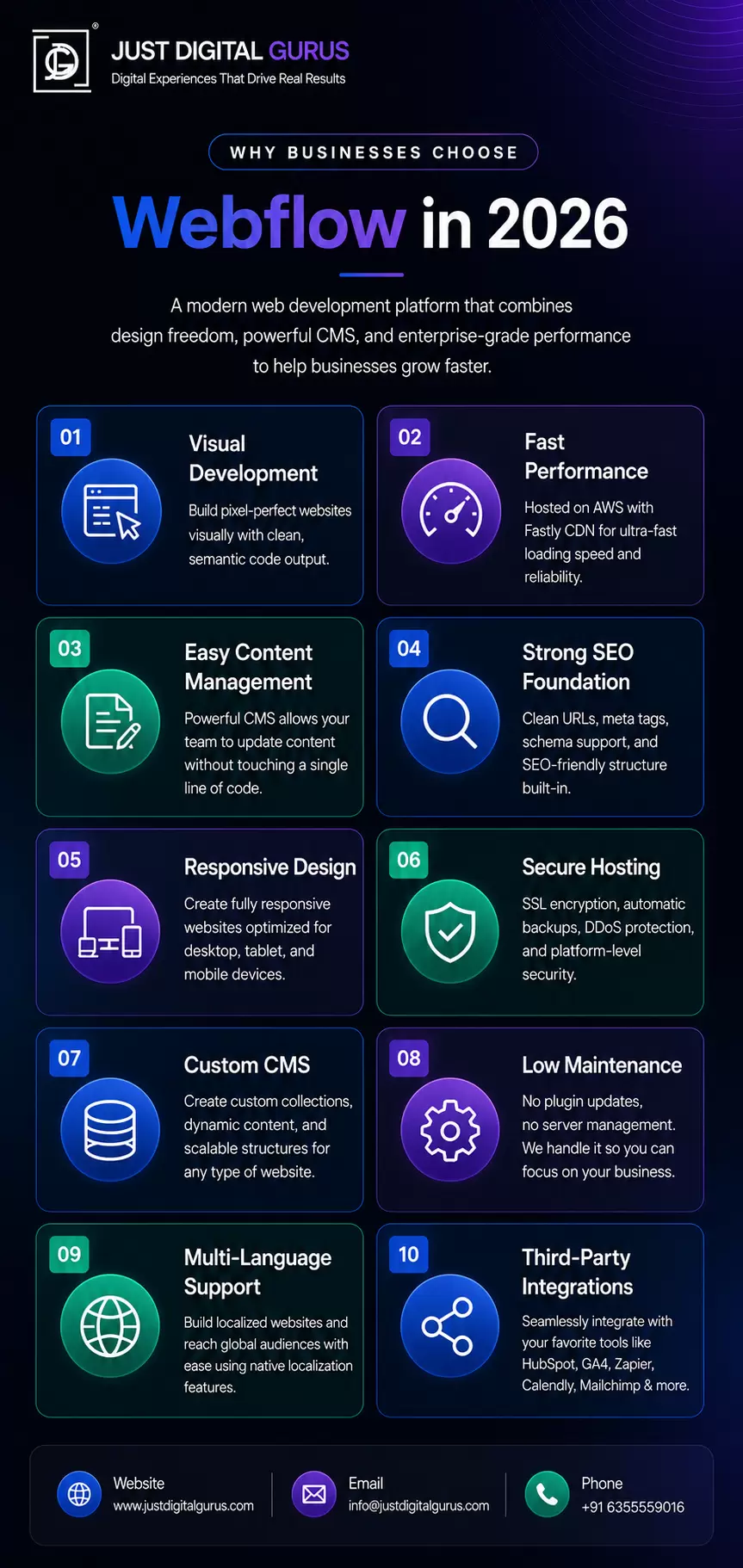
Three things come up consistently: control, speed, and low maintenance. You get more design freedom than any template builder, faster delivery than fully custom development, and hosting infrastructure that handles performance without constant tinkering.
Our web design and development services are built around exactly this, giving businesses a finished product that performs well from day one without the usual development overhead.
Key Benefits of Webflow Website Development
Faster Time to Market
A project that takes a traditional agency six to eight weeks can often be done in two to four weeks in Webflow. The visual environment collapses the gap between design and development. Revisions happen faster. Launch timelines get tighter.
Better Website Performance
Webflow's hosting runs on AWS with Fastly's CDN. Your site is served from edge locations close to your visitors. Load times are fast by default, not because of extra optimization work, but because the infrastructure and the code output are both lean.
Easier Content Management
The Webflow CMS lets you define custom content types and build dynamic pages connected to them. Your marketing team updates blog posts, case studies, and team pages without touching code or risking breaking anything.
Visual Development Without Sacrificing Flexibility
You're not limited to preset blocks. Every layout detail is yours. Animations, custom page structures, scroll interactions, all built natively. And when you need something genuinely custom, you can inject code. Webflow doesn't block you.
Webflow Platform at a Glance
Here's a quick snapshot of what the Webflow website development platform offers compared to what most businesses expect from a modern CMS:
| Feature | Webflow | Traditional CMS (e.g., WordPress) |
|---|---|---|
| Hosting | Managed (AWS + Fastly CDN) | Self-managed or third-party |
| Code Quality | Clean HTML/CSS/JS output | Varies widely by theme/plugin |
| Plugin Dependency | Minimal | Heavy |
| Security Updates | Handled by platform | Manual / plugin-dependent |
| Design Flexibility | High | Moderate (theme-constrained) |
| CMS Customization | Custom content types | Custom post types via plugins |
| Learning Curve | Moderate | Moderate to high |
| Performance (default) | Strong | Varies significantly |
| Ongoing Maintenance | Low | Medium to high |
Why Businesses Are Switching to the Webflow Website Development Platform
The migration trend is real. Companies running WordPress sites for years are moving to Webflow, and the reasons are pretty consistent.
Scalability is a big one. Traffic spikes don't require server upgrades or caching configurations. The platform handles it.
Security is another. Because Webflow is fully hosted, you're not responsible for keeping plugins patched against vulnerabilities. That's a significant operational relief for teams without dedicated developers.
Reduced maintenance frees up budget and time. A well-built Webflow site needs far less technical upkeep than a self-hosted CMS. Teams can focus on content and campaigns instead of server maintenance.
Content management has matured. Complex content structures are achievable now, making Webflow viable for content-heavy sites that previously needed WordPress or a headless CMS.
If your current site is slow, hard to update, or constantly breaking because of plugin conflicts, it might be worth exploring what a move to Webflow would actually look like. Our digital marketing services also factor heavily into how we structure a new Webflow build, making sure the site supports your broader growth goals from the start.
Custom Webflow Website Development Explained
Template-based Webflow builds work for simple use cases. But most businesses with real brand requirements or specific functional needs want custom Webflow website development, which means starting from scratch rather than modifying what already exists.
Building Unique User Experiences
Everything is designed around your users, your content, and your conversion goals. Navigation structure, page layouts, content hierarchy, none of it is borrowed from a template and forced to fit.
Take a look at some of our completed projects, such as Do Better Marketing, Radiant Home Cleaning Services, and Oras Medical, to see what custom Webflow builds actually look like across different industries.
Custom Animations and Interactions
Webflow's native interaction and animation tools are one of its strongest selling points. Scroll-triggered animations, hover states, page transitions, parallax sections, all buildable without JavaScript libraries. When these are done with restraint and purpose, they genuinely elevate the experience.
Third-Party Integrations
| Integration Type | Common Tools |
|---|---|
| CRM / Marketing | HubSpot, Mailchimp, ActiveCampaign |
| Automation | Zapier, Make (formerly Integromat) |
| Analytics | Google Analytics 4, Hotjar, Mixpanel |
| Ecommerce | Webflow native, Foxy.io, Shopify Buy Button |
| Forms | Typeform, Jotform, Webflow native forms |
| Booking / Scheduling | Calendly, Acuity Scheduling |
A good Webflow development team knows which integrations connect cleanly and which ones create more overhead than they're worth.
Webflow Multi-Language Website Development for Global Brands
If you serve customers across multiple countries or language markets, this is worth understanding carefully. Webflow now has native localization features that make multi-language website development significantly more manageable than workarounds used to require.
Benefits of Localization
Localization is more than translation. It means adapting content, formatting, imagery, and calls-to-action for specific regional audiences. A properly localized site performs better in local search and converts better because it actually speaks to the right people in the right way.
Managing Multi-Language Content
| Task | How Webflow Handles It |
|---|---|
| Language setup | Define primary locale, add secondary locales |
| Content translation | Translate within the CMS per locale |
| URL structure | Subdirectory-based (/fr/, /de/) or subdomain |
| Visual adjustments | Per-locale design overrides supported |
| Publishing control | Publish locales independently |
International SEO Strategies
For SEO, multi-language Webflow sites need proper hreflang tags, localized URLs, and region-specific metadata. This signals to search engines which version of content is relevant for which audience. Done poorly, it creates duplicate content problems. Done right, it builds strong local search presence in each market.
Our SEO consulting services cover exactly this kind of international SEO setup, making sure your multilingual Webflow site is structured correctly before it goes live.
Webflow vs Traditional CMS Platforms
Side-by-Side Comparison
| Criteria | Webflow | WordPress | Wix | Squarespace |
|---|---|---|---|---|
| Design Flexibility | Very High | High (with dev work) | Low | Moderate |
| Code Quality | Clean | Varies | Poor | Moderate |
| Plugin Ecosystem | Limited | Extensive | Limited | Limited |
| Hosting | Managed | Self-managed | Managed | Managed |
| Security | Platform-managed | User-managed | Platform-managed | Platform-managed |
| Performance (default) | Strong | Varies | Weak | Moderate |
| CMS Capability | Strong | Very Strong | Basic | Basic |
| Ongoing Maintenance | Low | High | Low | Low |
| Developer Dependency | Low | High | Very Low | Very Low |
| Best For | Business / Brand sites | Complex / Plugin-heavy sites | Simple personal sites | Portfolio / Small biz |
WordPress still leads for raw plugin availability and community size. If your site needs very specific functionality that only exists as a WordPress plugin, that's worth weighing. But for most business websites focused on performance, design quality, and manageable maintenance, Webflow is a stronger choice.
Essential Features of a Modern Webflow Website
| Feature | Why It Matters | Webflow's Approach |
|---|---|---|
| Responsive Design | Most traffic is mobile | Breakpoint-based design system |
| CMS Functionality | Content needs to scale | Custom collections + dynamic pages |
| SEO Optimization | Drives organic traffic | Native meta, schema, clean URLs |
| Accessibility | Legal + ethical requirement | ARIA support, keyboard navigation |
| Security | Protects users and data | HTTPS, platform-level security |
| Performance | Affects rankings + UX | CDN hosting + lean code output |
| Analytics Integration | Informs decisions | GA4, Hotjar, and others supported |
Alongside development, strong graphic design plays a big role in how a Webflow site actually feels to visitors. A technically clean site still needs visual design that earns trust and communicates clearly.
The Real Cost of Webflow Website Development
One of the most common questions businesses ask before committing. Here's an honest breakdown:
| Project Type | Estimated Cost Range | Timeline |
|---|---|---|
| Simple landing page | $1,500 - $3,500 | 1 - 2 weeks |
| Standard business website (5-10 pages) | $4,000 - $9,000 | 3 - 5 weeks |
| Custom site with CMS | $8,000 - $18,000 | 5 - 8 weeks |
| Ecommerce site | $10,000 - $25,000+ | 6 - 10 weeks |
| Multi-language site | $12,000 - $30,000+ | 8 - 12 weeks |
| Enterprise / complex platform | $30,000+ | 12+ weeks |
These are ballpark ranges. Actual costs depend on the scope, team experience, and how well-defined the project requirements are before work begins. Be cautious of quotes significantly lower than these ranges without a clear explanation of what's included.
If you want a more accurate estimate based on your specific project, book a call with our team and we'll walk through it with you.
Choosing the Right Webflow Website Development Company
This is where businesses often make decisions they regret. Not every agency that lists Webflow in their services has real depth with the platform. Here's how to evaluate properly.
Questions to Ask Before Hiring
- Can I see live Webflow sites you've built, not just screenshots?
- How do you structure CMS collections for a site like mine?
- What does your responsive design process look like?
- How do you handle revisions and feedback cycles?
- What post-launch support do you offer?
- How do you approach SEO during the build?
The quality of these answers tells you more than any sales pitch.
Evaluating Previous Webflow Projects
Open their portfolio sites in a browser. Run them through PageSpeed Insights. Check how animations behave on mobile. See how the CMS is organized if you can get a walkthrough.
You can browse our own portfolio here and see live sites we've built across industries including cannabis, healthcare, events, cleaning services, and marketing agencies. Each project is a real client site, not a concept piece.
Some specific examples worth looking at:
Understanding Development Costs
Refer to the cost table above. Any quote significantly below market range is worth questioning. It usually means template reliance, offshore teams with quality control gaps, or scopes that exclude mobile optimization and post-launch support.
Want to know more about who you'd actually be working with? Visit our about page or meet the Just Digital Gurus team directly.
Webflow Website Development Services Businesses Should Consider
| Service | What's Included | Who Needs It |
|---|---|---|
| Website Design & Build | Strategy, wireframes, design, development, launch | Businesses starting fresh or rebranding |
| CMS Implementation | Custom content structures, editor training | Sites with ongoing content publishing |
| Migration Services | Content migration, redirect mapping, SEO preservation | Moving from WordPress or other platforms |
| SEO Optimization | Technical setup, metadata, schema, performance tuning | Any site prioritizing organic search |
| Ecommerce Development | Product pages, cart, checkout, integrations | Businesses selling online |
| Multi-Language Setup | Locale configuration, hreflang, translation workflow | Global or multilingual businesses |
| Ongoing Maintenance | Updates, performance monitoring, content support | All businesses post-launch |
Our full range of services covers each of these areas. If you're not sure which combination makes sense for your project, get in touch and we'll help you figure it out.
Best Practices for Webflow Website Development
Optimizing Core Web Vitals
| Metric | What It Measures | Webflow Best Practice |
|---|---|---|
| LCP (Largest Contentful Paint) | Load speed of main content | Optimize hero images, use WebP format |
| CLS (Cumulative Layout Shift) | Visual stability | Set image dimensions, avoid dynamic injections |
| INP (Interaction to Next Paint) | Responsiveness to interaction | Minimize heavy scripts, clean interaction code |
Structuring Content for SEO
Plan your URL structures, CMS collection naming, heading hierarchies, and internal linking before development starts. Retrofitting these after a site is built is messy and incomplete. Good SEO architecture is a planning decision, not a development afterthought.
Our SEO consulting team works alongside development projects to make sure the technical foundation is solid from day one, not patched together after launch.
Designing for Conversions
Clear calls-to-action, logical page flow, trust signals, social proof, and fast load times all contribute to whether visitors actually do something when they arrive. These decisions should be built into the design process, not added later when conversion rates disappoint.
This is also where digital marketing strategy connects directly with web development. The site needs to be built with your marketing goals in mind, not just your visual preferences.
Common Challenges in Webflow Development and How to Solve Them
| Challenge | Why It Happens | How to Solve It |
|---|---|---|
| Complex integrations | Limited native plugin options | Use Make, Zapier, or custom API connections |
| CMS item limits | Platform-level collection caps | Plan architecture carefully; use headless for large data |
| Relational content | CMS doesn't support deep relational logic natively | Structure collections with reference fields strategically |
| Multilingual setup | Locale configuration requires planning | Start locale architecture before any design work |
| Custom functionality | Some features need code | Use Webflow's custom code embed + external libraries |
| Team permissions | Multi-editor workflows need structure | Define roles and publishing permissions early |
Webflow SEO: What You Actually Get Out of the Box
This section deserves its own focus because it's often misunderstood. Webflow gives you strong SEO foundations natively, but it's not fully automatic. Here's what the platform handles versus what requires your attention:
| SEO Element | Webflow Native Support | Requires Manual Setup |
|---|---|---|
| Meta titles and descriptions | Yes, per page | Content needs writing |
| Open Graph tags | Yes | Values need filling in |
| Schema markup | Partial (via custom code) | Structured data needs adding |
| Canonical tags | Yes | Review on duplicate content |
| Hreflang tags | Yes (with localization) | Needs configuration |
| Image alt text | Yes (editable) | Requires consistent practice |
| Clean URL structure | Yes | Planned before build |
| XML sitemap | Auto-generated | Needs submission to Search Console |
| Robots.txt | Editable | Review before launch |
| Page speed (CDN) | Yes, built-in | Asset optimization still needed |
If SEO is a priority for your new site, which it should be, pairing Webflow development with proper SEO consulting from the start makes a significant difference in how quickly the site gains traction after launch.
Webflow for Niche Industries: What We've Seen Work Well
One thing worth mentioning that most generic Webflow guides skip entirely: the platform works especially well for businesses in visually driven or regulated industries where design quality and performance really matter.
Cannabis Businesses
We've built multiple Webflow sites for cannabis dispensaries and brands. The combination of strong visual design, fast performance, and clean SEO output makes it a natural fit. Webflow also makes compliance-related content updates straightforward to manage.
If you're in the cannabis space, you can see our dedicated cannabis website design and cannabis SEO services pages, along with portfolio examples like Kolas, Dankpoet, The Cannabis Co, Ivy Hill, Green Remedy, and Natural Buds.
Service Businesses
Cleaning companies, event planners, makeup artists, healthcare providers, these are industries where a well-designed site directly influences whether someone picks up the phone. Webflow lets you build the kind of polished, trustworthy experience that converts. See examples like Best Cleaners & Alterations LLC, Annyse Brisbane Bridal & Event Makeup, and Oras Medical.
Marketing and Agency Sites
Agency websites live and die by how well they perform and how good they look. Do Better Marketing is a good example of a project where the Webflow build needed to reflect the agency's own standards, which means it had to be genuinely impressive.
Future Trends in Webflow Website Development
AI-Powered Design Workflows
Webflow is integrating AI into its editor, and this will accelerate. AI-assisted layout suggestions, copy generation support, and automated accessibility checks are already emerging. Teams that learn to work with these tools efficiently will have a meaningful speed advantage.
Advanced Personalization
Personalized web experiences based on visitor behavior, location, or customer segment are becoming more accessible without enterprise budgets. Webflow's integration ecosystem supports this direction, and as the tools mature, more businesses will use their websites as dynamic, adaptive experiences rather than static brochures.
Headless CMS Implementations
For enterprise projects, using Webflow as a visual front end connected to a separate data backend is gaining real traction. This gives teams the visual development experience they want with data handling flexibility that scales beyond the native CMS limits.
Increased Enterprise Adoption
Enterprise teams used to dismiss Webflow as a tool for smaller projects. Better team collaboration, localization support, SSO options, and professional-grade hosting are changing that perception quickly.
Conclusion
Webflow website development has moved well past the "interesting alternative" stage. It's a mature platform that delivers strong results for business websites across industries and project scales.
The real advantages are speed of development, clean performance output, manageable content editing, and solid SEO fundamentals built into the platform itself. For most business websites, these things matter more than having access to a massive plugin library.
If you're evaluating whether Webflow is the right fit for your next project, the honest answer is that it probably is, unless you have very specific functionality requirements the platform genuinely can't accommodate.
At Just Digital Gurus, we build Webflow sites that are fast, well-structured, and designed to actually perform. You can view our portfolio, explore our web design and development services, or book a call to talk through your project directly. No pressure, just an honest look at what makes sense for your goals.
Frequently Asked Questions
What is Webflow website development?
Webflow website development is the process of designing and building websites using the Webflow platform, which generates clean HTML, CSS, and JavaScript through a visual editor. It gives businesses professional, high-performing websites without the overhead of fully custom development or the limitations of basic website builders.
Why should businesses choose Webflow over WordPress?
Webflow offers better default performance, cleaner code output, managed hosting on a fast CDN, and far less ongoing maintenance compared to WordPress. You don't deal with plugin conflicts, outdated software vulnerabilities, or server management. For most business websites, Webflow delivers a better result with significantly less technical overhead.
How much does custom Webflow website development cost?
Costs range widely based on scope. A standard business website typically runs between $4,000 and $9,000. Complex sites with custom CMS structures, integrations, ecommerce, or multi-language support can run $15,000 to $30,000 or more. Refer to the cost table in this guide for a fuller breakdown by project type. You can also book a call for a more specific estimate.
Can Webflow support multi-language website development?
Yes. Webflow has native localization features that support multiple languages, including locale-specific content management, hreflang implementation, and region-targeted URL structures. Pairing this with proper SEO consulting ensures the multilingual setup actually supports your search visibility goals.
How do I choose the best Webflow website development company?
Look at live Webflow sites in their portfolio and test them in a browser. Run PageSpeed checks. Ask specific questions about their CMS structure process, responsive design approach, and post-launch support. You can meet our team, review our portfolio, and contact us directly if you'd like to evaluate whether we're a good fit for your project.

Your comment will appear after approval.