
 Written By :
 ChatGPT
 Perplexity
 Claude
 Gemini
You open Safari on your iPhone, visit a website, and suddenly the browser's address bar and tab area take on the color of that site. The whole interface shifts to match. If you've noticed this and wondered what's going on, you've just experienced website tinting.
It's a small detail, but it's one of those things that once you notice it, you can't unsee it. And a lot of people either love it or find it slightly disorienting, which is probably why "what is website tinting" gets searched so often.
Let's break it down properly.
What Is Website Tinting?
Definition of Website Tinting
Website tinting is a Safari browser feature that automatically changes the color of the browser's user interface elements, specifically the address bar, tab bar, and surrounding chrome, to match the dominant color or theme of the website you're currently visiting.
So if you're on a website with a deep navy header, Safari's address bar might shift to a similar dark blue. Visit a site with a bright white design and the browser interface stays clean and light. The idea is that the browser blends into the website rather than sitting on top of it as a separate visual layer.
It's a purely cosmetic feature. It doesn't change the website itself, doesn't affect how pages load, and doesn't touch any content. It only changes how the Safari interface looks while you're on a particular page.
Why Apple Introduced Website Tinting
Apple introduced website tinting as part of their ongoing effort to make Safari feel more immersive and integrated with the content you're viewing. The goal was to reduce the visual separation between the browser shell and the webpage, creating a more seamless browsing experience.
It fits with Apple's broader design philosophy: reduce visual noise, make the interface feel natural, and let the content take center stage. When the browser matches the site you're on, the address bar feels less like a separate tool and more like part of the overall experience.
Apple rolled this out with iOS 15 in 2021 and it's been a standard Safari feature since then, though it can be toggled on or off depending on your preference.
How Website Tinting Changes the Safari Interface
Without website tinting, Safari's toolbar stays a consistent color regardless of what site you're on. With it enabled, the toolbar dynamically shifts color as you navigate between websites.
The change is subtle on some sites and quite noticeable on others. A site with a strong brand color in its header will produce a more dramatic tint. A site with a plain white or minimal design might produce almost no visible change at all.
The effect applies to:
- The address bar background
- The tab bar area
- The status bar at the top of the screen (in some cases)
It does not change the content area of the webpage itself.
What Is Website Tinting on Safari?
Website Tinting in Safari Explained
Website tinting in Safari is the specific implementation of this color-matching feature within Apple's browser. It's not a general web technology that all browsers use. It's a Safari-specific feature that Apple built into their iOS and iPadOS browser experience.
When you enable website tinting on Safari, the browser reads the color information from the website you're visiting and applies a matching tint to its own interface elements. This happens automatically and updates in real time as you move between pages or tabs.
The feature is part of Safari's broader appearance settings, which also include options for controlling the tab bar position and other visual preferences.
How Safari Matches Website Colors
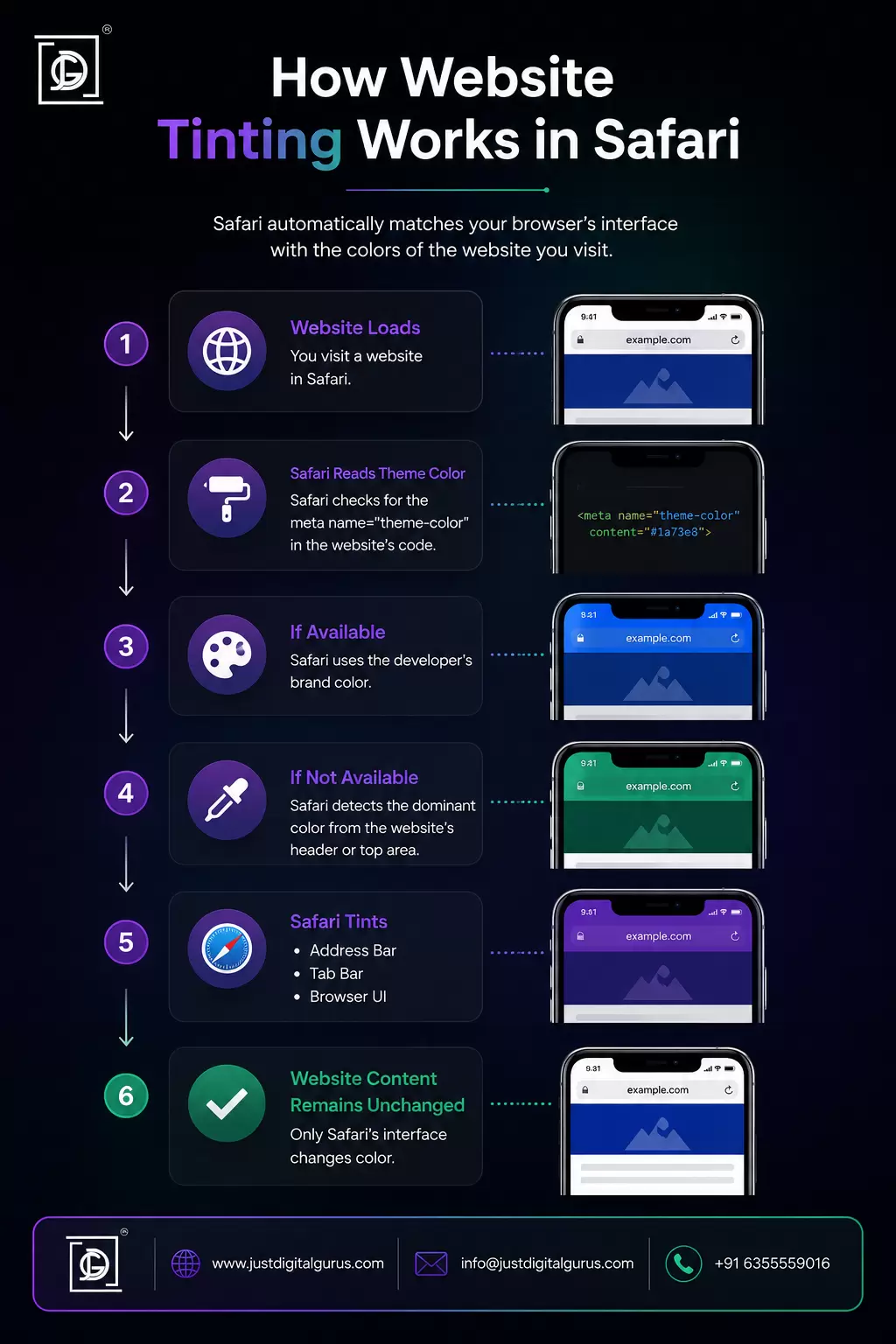
Safari uses a combination of methods to determine what color to apply. The most direct is the HTML meta tag called theme-color. Web developers can add this to their site's code to specify exactly what color they want browsers to use when tinting the interface.
It looks something like this in a website's HTML:
HTML
<meta name="theme-color" content="#1a73e8">
When Safari encounters this tag, it reads the specified color and applies it to the browser UI. If no theme-color meta tag is present, Safari may sample the dominant color from the page's header area instead, though this behavior can vary.
This means safari website tinting works best on websites where the developer has explicitly set a theme color. On sites that haven't, the result can be inconsistent or barely noticeable.
Does Website Tinting Affect Website Content?
No. Website tinting only changes the appearance of Safari's own interface elements. The webpage content, including text, images, layouts, and colors, remains completely unchanged.
If you're a web designer or developer worried that this feature might alter how your site looks to users, it won't. Your site renders the same way it always has. The only thing that changes is the strip of browser chrome surrounding the page.
What Is Website Tinting on iPhone?
Website tinting on iPhone refers to the same Safari feature, just specifically on iOS devices. Since Safari is the default and primary browser on iPhone, this is where most people encounter and notice the feature.
Supported iPhone Models
Website tinting is available on any iPhone that supports iOS 15 or later. That covers a wide range of devices. As a rough guide:
| iOS Version | Minimum iPhone Model |
|---|---|
| iOS 15 | iPhone 6s |
| iOS 16 | iPhone 8 |
| iOS 17 | iPhone XS |
| iOS 18 | iPhone XS |
If your iPhone can run iOS 15 or above, it supports website tinting on iPhone through Safari. Older devices that are stuck on iOS 14 or earlier won't have this feature available.
iOS Versions That Include Website Tinting
Website tinting was introduced with iOS 15 and has been carried forward through iOS 16, 17, and 18. The feature has remained fairly consistent since its introduction, with no major changes to how it works, just minor refinements to the overall Safari interface it applies to.
Compatibility with Safari
Website tinting is a Safari-exclusive feature on iPhone. Third-party browsers like Chrome, Firefox, or Edge on iOS don't implement this feature in the same way, even though they technically run on the same WebKit engine that Apple requires for all iOS browsers.
If you primarily use Chrome or Firefox on your iPhone, you won't see this behavior. It's specific to Safari's interface.
What Is "Allow Website Tinting"?
Meaning of the Setting
"Allow Website Tinting" is the toggle in Safari's settings that controls whether this color-matching feature is active. When it's on, Safari dynamically adjusts its interface colors to match the websites you visit. When it's off, Safari maintains a consistent appearance regardless of the site you're on.
The setting gives users control over the feature. Apple didn't force it on everyone without an opt-out, which is a reasonable approach given that not everyone finds the dynamic color changes appealing.
Difference Between On and Off
Allow Website Tinting: ON
- Safari's address bar and tab area change color to match websites
- Browsing feels more immersive and visually integrated
- The effect varies by website depending on whether they've set a theme color
Allow Website Tinting: OFF
- Safari maintains a consistent, neutral appearance
- Address bar stays the same color regardless of what site you're on
- Some users find this cleaner and less distracting
Neither option affects browsing speed, security, or functionality. It's purely a visual preference.
Where to Find the Option
To find the allow website tinting setting on iPhone:
- Open the Settings app
- Scroll down and tap Safari
- Scroll to the Tabs section
- Look for "Allow Website Tinting" and toggle it on or off
The exact location of this setting can vary slightly depending on which version of iOS you're running, but it's consistently found within Safari's settings under the appearance or tabs section.
On iPad, the path is the same: Settings > Safari > Allow Website Tinting.
How Website Tinting Works
Color Extraction from Websites
As mentioned earlier, Safari primarily relies on the theme-color meta tag that web developers can include in their HTML. This is the most reliable and intentional way for a site to communicate its preferred browser color.
If that tag isn't present, Safari may fall back to sampling colors from the page itself, often from the header or navigation area. This fallback is less precise and can sometimes produce unexpected results.
Dynamic Browser UI Coloring
The color change happens in real time. As you navigate from one site to another, the browser interface transitions between colors. The transition is usually smooth and quick rather than an abrupt jump.
When you switch tabs, the color updates to match whichever tab you're now viewing. Open a new tab or visit the Safari start page and the interface returns to its default appearance.
Examples of Website Tinting
To make this concrete:
- Visit a news site with a red masthead and Safari might tint to a deep red
- Open a financial services site with a dark green header and the browser shifts to match
- Browse a minimal white portfolio site and you'll barely notice any change
- Visit a site with no
theme-colortag and results vary
The feature is most striking on sites with strong, distinctive brand colors. For sites with neutral or white designs, website tinting is almost invisible in practice.
For businesses thinking about how their website appears across different browsers and devices, this is actually worth considering during the design phase. Our web design and development team thinks about these cross-device details when building sites, including how your brand colors translate in different browsing contexts.
Benefits of Website Tinting
More Immersive Browsing
The main selling point of website tinting is immersion. When the browser interface takes on the color palette of the site you're visiting, the experience feels less like "using a browser to view a website" and more like just being on the website itself.
For content-heavy sites, media platforms, and well-designed brand experiences, this genuinely enhances the feel of browsing.
Improved Visual Consistency
For websites that have carefully considered their brand colors and implemented a theme-color meta tag, safari website tinting creates a cohesive visual experience that extends the brand identity into the browser chrome itself.
A brand that's put serious thought into its visual identity gets a small but meaningful bonus: even the browser feels on-brand. That's a detail most users won't consciously notice, but it contributes to an overall impression of polish.
This is one reason why investing in thoughtful web design and graphic design pays off in ways that go beyond just the visible content of a page.
Better User Experience
Reducing the visual contrast between browser chrome and page content can make browsing feel smoother. There's less mental switching between "this is the browser" and "this is the website." It's a subtle UX improvement that aligns with the broader trend toward more immersive digital experiences.
Modern Safari Appearance
For users who appreciate Safari's design evolution, website tinting is part of what makes the current version of Safari feel contemporary and thoughtfully designed. It's one of several features Apple has introduced to differentiate Safari visually from other browsers.
Drawbacks of Website Tinting
May Distract Some Users
Not everyone finds the color changes pleasant. If you're someone who values consistency and predictability in your browser interface, having the address bar suddenly shift to a bright orange or deep purple every time you open a new site can feel jarring.
Some users specifically turn off website tinting because they find the constant color shifting distracting, especially when switching rapidly between multiple tabs.
Accessibility Considerations
For users with certain visual sensitivities or conditions like photosensitivity, sudden interface color changes could be uncomfortable. Apple's implementation is generally smooth enough that it avoids being jarring, but it's worth knowing the setting can be disabled if the color changes cause any issues.
Users who rely on consistent visual cues for navigation may also prefer the stable appearance that comes with turning allow website tinting off.
Color Accuracy Issues
Because the feature depends on either developer-provided theme colors or Safari's own color sampling, the results aren't always ideal. Some websites produce tints that look slightly off or clash with Safari's own UI elements.
If a site hasn't set a theme-color tag and Safari samples an unexpected color from the page, the result can occasionally look more awkward than polished. This is really a limitation of how the feature is implemented across the broader web rather than a flaw in the concept itself.
How to Enable or Disable Website Tinting
Steps on iPhone
To turn on website tinting:
- Open Settings
- Tap Safari
- Under the Tabs section, find Allow Website Tinting
- Toggle it on (green)
To turn off website tinting:
- Same path: Settings > Safari
- Toggle Allow Website Tinting to off (grey)
Changes take effect immediately. You don't need to restart Safari or your phone.
Steps on iPad
The process is identical on iPad:
- Open Settings
- Tap Safari
- Find Allow Website Tinting and toggle as preferred
The iPadOS version of Safari handles tinting slightly differently visually since the browser layout is different on a larger screen, but the setting works the same way.
Troubleshooting if Option Isn't Available
If you can't find the allow website tinting option, a few things could explain it:
- Your iOS version is older than iOS 15. Update your iPhone if possible.
- You're using a third-party browser. This setting only appears for Safari.
- The option may be in a slightly different location depending on your iOS version. Try searching "tinting" in the Settings search bar.
If you've updated to a recent iOS version and still can't find it, it's worth checking Apple's support documentation since UI changes between iOS versions occasionally move settings around.
Website Tinting vs Traditional Safari Appearance
Visual Comparison
| Aspect | Website Tinting On | Website Tinting Off |
|---|---|---|
| Address bar color | Changes per website | Consistent/neutral |
| Tab bar color | Changes per website | Consistent/neutral |
| Immersion | Higher | Lower |
| Consistency | Variable | Predictable |
| Visual distraction | Possible | Minimal |
| Brand integration | Stronger | Neutral |
Which Option Is Better?
Honestly, it's personal preference. There's no objectively correct answer here.
If you browse a lot of well-designed websites with strong visual identities and you appreciate a polished, immersive experience, website tinting adds a nice touch. If you prefer a clean, consistent browser interface that looks the same regardless of where you are on the web, turning it off is completely reasonable.
User Preferences
From what's generally observed online, opinions split fairly evenly. Design-oriented users and those who notice and appreciate UI details tend to keep it on. Users who prefer minimal distraction or who find the color shifts jarring tend to turn it off.
Apple made it a toggleable setting precisely because there's no universal preference. Use whichever works for you.
A Note for Web Developers and Businesses
If you're building or managing a website, website tinting is worth knowing about from a design perspective. Adding a theme-color meta tag to your site gives you control over how your brand appears in Safari's tinted interface, rather than leaving it to Safari's automatic color sampling.
It's a small addition to your HTML head section that can meaningfully improve how your site feels on mobile Safari:
HTML
<meta name="theme-color" content="#yourBrandColorHex">
Choose a color that represents your brand and works well against Safari's interface elements. Usually your primary brand color or the color of your site's header is a good starting point.
This kind of attention to cross-device detail is part of what separates a professionally built website from a basic one. If you want your site to look polished across every device and browser context, our web design and development services cover these details as standard practice.
For a broader look at building websites that perform well technically and visually, our SEO-friendly website guide and website management guide are worth bookmarking.
Frequently Asked Questions About Website Tinting
Is Website Tinting Safe?
Yes, completely. Website tinting is a purely visual feature controlled by Safari itself. It doesn't give websites access to any additional data, doesn't affect your privacy settings, and doesn't interact with website content in any functional way.
Does Website Tinting Affect Website Performance?
No. The color of Safari's interface has no bearing on how fast pages load, how JavaScript runs, or how any other technical aspect of the browsing experience works.
Does Website Tinting Change Website Colors?
No. Website tinting only changes Safari's own interface elements, not the webpage content. Everything on the page looks exactly the same as it always did.
Can Developers Control Website Tinting?
Yes, to an extent. Web developers can specify a preferred tint color using the theme-color meta tag in their HTML. Safari will use this color when applying website tinting in Safari. Without this tag, Safari makes its own determination, which is less predictable.
Why Doesn't Website Tinting Work on Some Websites?
A few reasons:
- The site hasn't set a
theme-colormeta tag - The site uses a very neutral or white color palette that produces a barely noticeable tint
- The site's design doesn't provide a clear dominant color for Safari to sample
It's not a bug. Some sites just don't produce a visible tinting effect.
Does Chrome Have Website Tinting?
Chrome on Android has a similar feature where the browser's toolbar can adopt a website's theme color. On iOS, Chrome uses Apple's WebKit engine but doesn't implement safari website tinting in the same way since that's a Safari-specific feature.
Does Website Tinting Use More Battery?
Almost certainly not in any meaningful way. Rendering a colored toolbar instead of a neutral one is computationally trivial. If you're concerned about battery life, website tinting is not a factor worth worrying about.
Can Website Tinting Be Disabled Permanently?
Yes. Toggling off allow website tinting in Safari settings is a persistent change. It stays off until you manually turn it back on. There's no automatic reset or expiration.
Final Thoughts
Website tinting is one of those features that quietly improves the browsing experience for people who appreciate it, while being easy to ignore or disable for those who don't. It's not a groundbreaking technology, but it's a thoughtful design detail that shows Apple's attention to how Safari feels in everyday use.
Understanding what is website tinting on Safari also matters if you're a developer or business owner. Adding a theme-color meta tag to your site is a small effort that gives you control over how your brand presents in one of the most-used mobile browsers in the world.
If you're looking to make sure your website is built with these kinds of details in mind, covering everything from mobile appearance to technical SEO to overall design quality, the team at Just Digital Gurus handles all of it.
From web design and development to digital marketing and SEO consulting, we help businesses build websites that look right, work right, and rank well.
Get in touch or book a call if you want to talk through your website's design or performance.
Your comment will appear after approval.