
 Written By :
 ChatGPT
 Perplexity
 Claude
 Gemini
Imagine you're writing a research paper and need to cite an online article. You've got the title, the URL, and the date, but one field is blank: publisher. Or maybe you're an SEO manager building a link-building campaign and you need to figure out who actually runs a site before you pitch them.
Whatever the reason, knowing how to find the publisher of a website is one of those skills that comes up more than you'd expect.
The good news: most of the time, it isn't hard. Publishers leave traces. Knowing where to look, and which tools to use, makes the process fast even if you have no technical background. This guide walks you through 7 methods that actually work, from the quick and obvious to the more thorough approaches when a site doesn't give you easy answers.
Whether you're a student chasing down a citation, a marketer vetting a media contact, or a founder doing due diligence on a potential partner, at least one of these methods will get you the answer you need.
Why You Need to Know How to Find Out the Publisher of a Website
Most people assume they'll never need to dig for publisher information. Then they hit a moment where they do, and they realize they have no idea where to start. Here are the most common situations where this skill pays off.
Students and academic researchers need publisher details for citations in APA, MLA, or Chicago format. Without the publisher, a citation is incomplete, and depending on the institution, that can cost marks. Journalists and PR professionals need to identify who runs a site before they can pitch a story, request a correction, or build a media relationship.
For them, the company name is just the starting point; they need to find the right contact. SEO managers and link-building teams need to verify site ownership before outreach. Knowing the real organization behind a site helps you avoid spammy middlemen and target legitimate publishers.
Startup founders and brand managers often check publisher details when vetting a partnership or sponsorship opportunity. And legal or compliance teams sometimes need publisher information for notice and takedown requests, advertising compliance checks, or regulatory audits.
"The websites we trust are the ones that make ownership easy to find. When a site hides who's behind it, that's rarely an accident."
Common Reasons to Find a Website Publisher
| Reason | Who Needs It | Best Method |
|---|---|---|
| Academic citation | Students, researchers | About page, WHOIS, article byline |
| Link-building outreach | SEO managers, PR teams | LinkedIn, social media, email finder |
| Competitor research | Marketing managers | WHOIS, Ahrefs/SEMrush |
| Verifying site legitimacy | Startup founders | About page, WHOIS |
| Legal or compliance check | Legal teams, agencies | WHOIS, domain registrar |
| Sponsorship or partnership | Brand managers | Footer, LinkedIn, contact page |
Method 1: Check the About Page and Footer
This should always be your first step. The majority of legitimate websites publish ownership information somewhere on the site. You just need to know where to look.
Start with the footer at the bottom of any page. Most sites include a copyright line (something like "Copyright 2024 Acme Media LLC") along with links to their About page, Contact page, and Privacy Policy. Each of those pages often contains additional detail about who runs the site.
If the footer doesn't give you enough, click through to the About page. Look for:
- A company name or organization name
- Names of editors, founders, or key staff
- A physical address or registered business location
- Links to parent companies or affiliated organizations
- A contact email or phone number
The Contact page is another overlooked resource. It often names departments, editorial contacts, or a business owner directly. For news sites and media brands, look for a Masthead or Editorial Team page, as these almost always list who is responsible for the publication.
Method 2: Use WHOIS Lookup to Find the Publisher of a Website
WHOIS is a public database that stores registration information for every domain name on the internet. When someone registers a domain, they submit contact details that may include the registrant's name, email address, organization, and location. That information is often publicly accessible.
The most reliable WHOIS lookup tools include:
- who.is (simple, fast, no sign-up required)
- ICANN Lookup at lookup.icann.org (the official source)
- DomainTools at domaintools.com (more detailed for research purposes)
To use any of these, just enter the domain name (for example, example.com) and the tool returns whatever registration data is available.
One important caveat: many domain owners use privacy protection services like WhoisGuard or Domains By Proxy. These services mask the owner's personal details and replace them with the privacy provider's contact information.
Even so, the registrar name is still visible, and you may be able to infer something from the email domain used.
WHOIS is especially useful when you want to know how to find the publisher or sponsor of a website and the site itself provides no public contact information. It's also a good cross-reference to verify that the company name on an About page matches the actual domain registrant.
Method 3: Check the Website's Article Bylines to Find the Author and Publisher
Individual articles often tell you more about the publisher than the homepage does. When trying to understand how to find the author and publisher of a website, article bylines are one of the most reliable starting points.
Look at the top or bottom of any article for a "Written by" or "By [Name]" line. Most professional sites include a short author bio with details about the writer's role at the publication. That bio often includes:
- The author's job title (editor, contributor, managing editor, etc.)
- The name of the organization or publication
- A link to the author's full profile page
- Social media links, especially LinkedIn
If you click through to an author's profile, you'll often find the publisher's name listed explicitly, along with other staff members. From there, a quick LinkedIn search on the publication name will confirm the organization and give you access to the full team.
This method is especially effective for editorial sites, news outlets, content marketing blogs, and niche media publications. It works less reliably on thin affiliate sites or single-author personal blogs, where the "author" and the "publisher" are often the same person.
Method 4: Use Google Search Operators
Google search operators are simple commands you type directly into the search bar to filter results. They're not complicated, and they work well for surfacing publisher information that isn't immediately obvious.
Here are a few search patterns that work well:
- site:domain.com "about us" - finds the About page directly when the site's internal navigation is cluttered
- "domain.com" publisher - often surfaces directory listings or press mentions that name the organization
- "domain.com" contact editor - helpful for finding editorial contact pages indexed by Google
- "domain name" owned by - sometimes pulls up news coverage of acquisitions or ownership changes
A real example: if you want to find who runs techcrunchexample.com, you could search: site:techcrunchexample.com "about us" OR site:techcrunchexample.com "editorial team". Google will surface the specific pages most likely to contain that information, even if they're buried under a heavy navigation structure.
This approach works best when combined with another method. Use it to locate the right page quickly, then read that page for the actual publisher details. If you're also trying to make your own site easier to find through search, our guide on building an SEO-friendly website is a good starting point.
Method 5: Check Social Media and LinkedIn Profiles
Most legitimate websites link their social media accounts from the header or footer. These links connect to the brand's official profiles, which almost always name the parent company or organization.
LinkedIn is particularly useful here. Search the website's brand name directly on LinkedIn and look for a company page. The company page typically shows:
- The official organization name and description
- The company's size, industry, and founding date
- Key employees, including founders and editors
- Related companies or subsidiaries
If you're trying to verify a sponsor relationship or a media partnership, LinkedIn gives you the clearest view of the real organization behind a site. You can see whether the "publisher" is a proper company with a team, or a single-person operation with a shell brand.
Twitter/X, Facebook pages, and Instagram accounts are useful secondary checks. Many publishers list their official business name in their bio, and the account creation date can give you a rough sense of how long they've been operating. For brands that want to build a credible, verifiable presence across channels, a solid website marketing strategy is what ties it all together.
Method 6: Use Website Analysis Tools
For marketing managers and SEO professionals who want deeper insight into a site's background, several tools surface domain and company information that isn't publicly visible through basic searches.
The most commonly used options:
- Ahrefs: Beyond backlink data, Ahrefs shows the organization behind a domain in some cases and gives you traffic data that helps you gauge whether a site is a serious publisher or a thin affiliate site.
- SEMrush: Similar to Ahrefs, with a strong competitor research suite. Looking at a site's top pages, organic traffic, and keyword profile helps you understand what kind of operation runs it.
- SimilarWeb: Provides audience data and company information, often including parent company details for larger media properties.
- BuiltWith: Shows the technology stack a site uses. Useful for understanding whether a site runs on a corporate CMS or a DIY setup, which can help infer the scale of the operation.
These tools are most useful during competitor research or when you're evaluating a site for a link partnership. They're less relevant for a one-off citation lookup, where the About page or WHOIS check will be faster. If the analysis flags that a competitor is outranking you and you want to close the gap, working with an SEO consultant can help you turn those insights into an action plan.
Method 7: How to Find the Publisher of a Website for Citation
Citation requirements are specific, and getting them wrong can affect the credibility of your work. Here is a step-by-step process for finding publisher details when your goal is to cite a source accurately.
Step 1: Check the Article Page
Look at the article itself for author information, publication date, and any mention of the publishing organization. Many academic-leaning sites and serious outlets list publisher details right on the content page.
Step 2: Check the About Page
If the article page gives you only a name, the About page usually provides the full organization name, which is what most citation formats require.
Step 3: Run a WHOIS Lookup
If the site has no About page or the publisher is unclear, check who.is or ICANN Lookup for the registered organization name. Note that privacy-protected domains may not yield useful results here.
Step 4: Check the Copyright Line
Scroll to the footer and look for a copyright notice. The name in a copyright line ("Copyright 2024 Horizon Publishing Group") is almost always the legal publisher's name.
Step 5: When No Publisher Is Found
If you've gone through all the above steps and still can't find a named publisher, citation guides including the Purdue OWL recommend using the website's domain name as a stand-in publisher. This is accepted practice in APA, MLA, and Chicago formats.
Citation Format When Publisher Is Known vs. Unknown
| Citation Style | Publisher Known | Publisher Unknown |
|---|---|---|
| APA | Publisher name after article title | Use website domain name |
| MLA | Italicize site name as publisher | Use site domain as publisher |
| Chicago | List publisher after title | Note "no publisher identified" |
How to Find the Publisher of a Website Article: Tips for Journalists and Outreach Teams
When you're doing outreach at scale, knowing who publishes a site is just the first step. The real goal is identifying the right contact: the editor who makes decisions, the content manager who handles pitches, or the webmaster who controls link placements.
Start with the masthead or editorial team page if the site is a media outlet. These pages name editors by topic area, which saves you from firing generic pitches at a contact@ address that nobody checks.
For content blogs and niche publishers, the About page often names the person running the site, and a quick LinkedIn check confirms their current role and contact preferences.
Once you know the publisher and have a name, tools like Hunter.io and Apollo.io can surface a verified email address.
This is the handoff point between identifying the publisher and actually reaching out. The quality of your outreach depends on how well you've done the research first.
For link-building campaigns, knowing the real organization behind a site helps you assess whether a placement will carry genuine SEO value or whether the site is a privately-owned network with no real editorial oversight.
That distinction matters. If you want a broader view of how to build an SEO strategy that accounts for link quality and site authority, our guide on cheap website SEO approaches that actually work covers the fundamentals without the fluff.
What to Do When You Cannot Find the Publisher of a Website
Not every search ends with a clear answer. Some sites are deliberately opaque. Here's what to do when you hit a wall.
Common reasons a publisher is hard to find:
- Privacy protection on the WHOIS record (very common with smaller sites)
- No About page, no contact page, and no footer credits
- A thin affiliate site with no real editorial identity
- A parked domain or expired site with placeholder content
If the standard methods don't work, try these secondary options:
- Check archive.org (the Wayback Machine): Older snapshots of the site may show publisher information that has since been removed. Even a version from two years ago can name the owner clearly.
- Search Google's cache: Type cache:domain.com in Google to see a recently indexed version of the page. Sometimes the cached version still shows details that have been edited out of the live site.
- Search for press mentions: Try searching the domain name in Google News or a general search. Third-party coverage of the site may name the publisher even when the site itself doesn't.
When none of these options surfaces a publisher, it's reasonable to conclude the site is operating without a clear public identity. For citation purposes, use the domain name. For outreach purposes, consider whether the site is worth pursuing at all. A publisher with no verifiable identity carries real credibility risk.
Frequently Asked Questions
How do I find the publisher of a website for a citation?
Start with the About page and the footer copyright line. If the publisher isn't listed there, run a WHOIS lookup using who.is or ICANN Lookup. If you still can't find a named publisher, citation guides like Purdue OWL allow you to use the website's domain name in place of a publisher name, which is accepted in APA, MLA, and Chicago formats.
What is the difference between a website author and a publisher?
The author is the individual who wrote a specific article or piece of content. The publisher is the organization or individual that owns and operates the website where that content appears. One site can have many authors but typically has one publisher. In some cases, particularly personal blogs and solo content sites, the author and publisher are the same person.
Can I find the publisher of a website if there is no About page?
Yes. Try a WHOIS lookup to see who registered the domain. Check the footer for a copyright line or a linked privacy policy, as those documents often name the legal entity. You can also search the brand name on LinkedIn or look for press mentions that name the publisher. Archive.org may also show older versions of the site that included publisher details.
Is WHOIS lookup free to use?
Yes. Tools like who.is and ICANN Lookup at lookup.icann.org are completely free and require no account. DomainTools offers a free basic lookup but charges for more detailed historical records. The free versions are sufficient for most publisher identification tasks.
How do I find the publisher or sponsor of a website for outreach?
Start by identifying the publishing organization using the About page, WHOIS, or LinkedIn. Once you have the company name, search LinkedIn for the specific team members who handle editorial decisions or content partnerships. From there, email finders like Hunter.io or Apollo.io can surface a verified contact address. The key is to move from the site to the organization to the right individual, in that order.
Final Thoughts
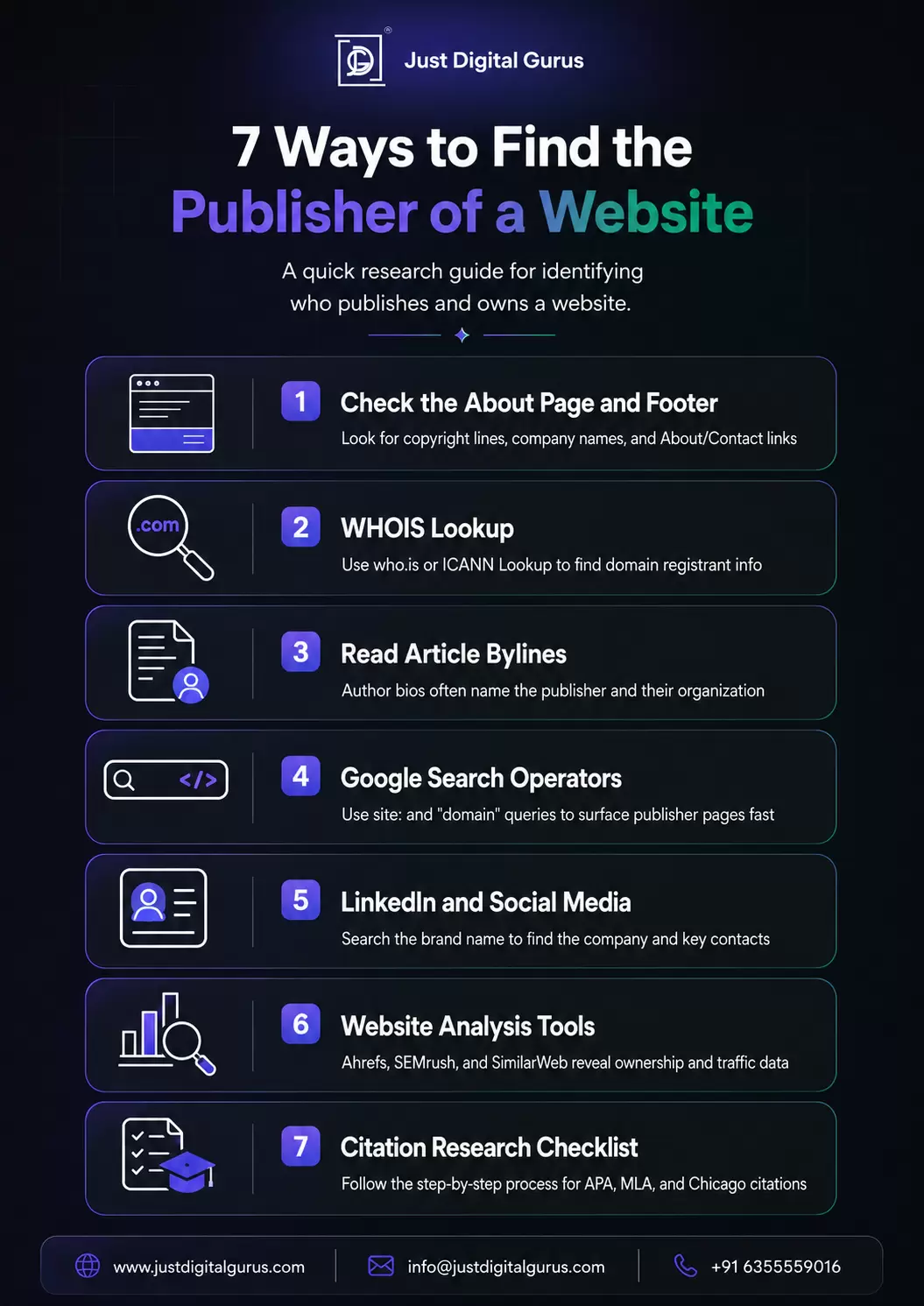
Finding the publisher of a website doesn't have to take long. Here's a quick recap of the 7 methods covered in this guide:
- Check the About page and footer for direct ownership disclosures.
- Use WHOIS lookup tools like who.is and ICANN to check domain registration data.
- Read article bylines and author bios for organizational affiliation.
- Use Google search operators to surface the right pages quickly.
- Search social media and LinkedIn for brand profiles and key contacts.
- Use tools like Ahrefs, SEMrush, or SimilarWeb for deeper analysis.
- Follow the citation research checklist for academic or formal source documentation.
Knowing who is behind a website gives you better information for every decision you make with that site, whether you're citing it, reaching out to it, partnering with it, or evaluating it for quality. In a world where anyone can publish anything, that due diligence matters more than people realize.
If you want your own website to be clearly branded, easy to find, and credible to anyone who looks, the team at Just Digital Gurus offers web design and development, SEO consulting, and full-service digital marketing built around exactly that goal. Visit justdigitalgurus.com to explore our services or connect with our team.

Your comment will appear after approval.